

Overview
The ServiceNow Incident Management integration synchronises incidents between Innomesh and your organisation’s ServiceNow instance. Incidents flow in both directions: incidents raised in Innomesh, whether created manually or by an Incident Rule, are created in ServiceNow, and incidents raised or updated in ServiceNow appear in the Innomesh Hotlist. Your AV operations team and your service desk work from the same incident record, in whichever system they prefer.
The integration is standalone: it does not require the ServiceNow CMDB Integration, and either can be adopted independently of the other.
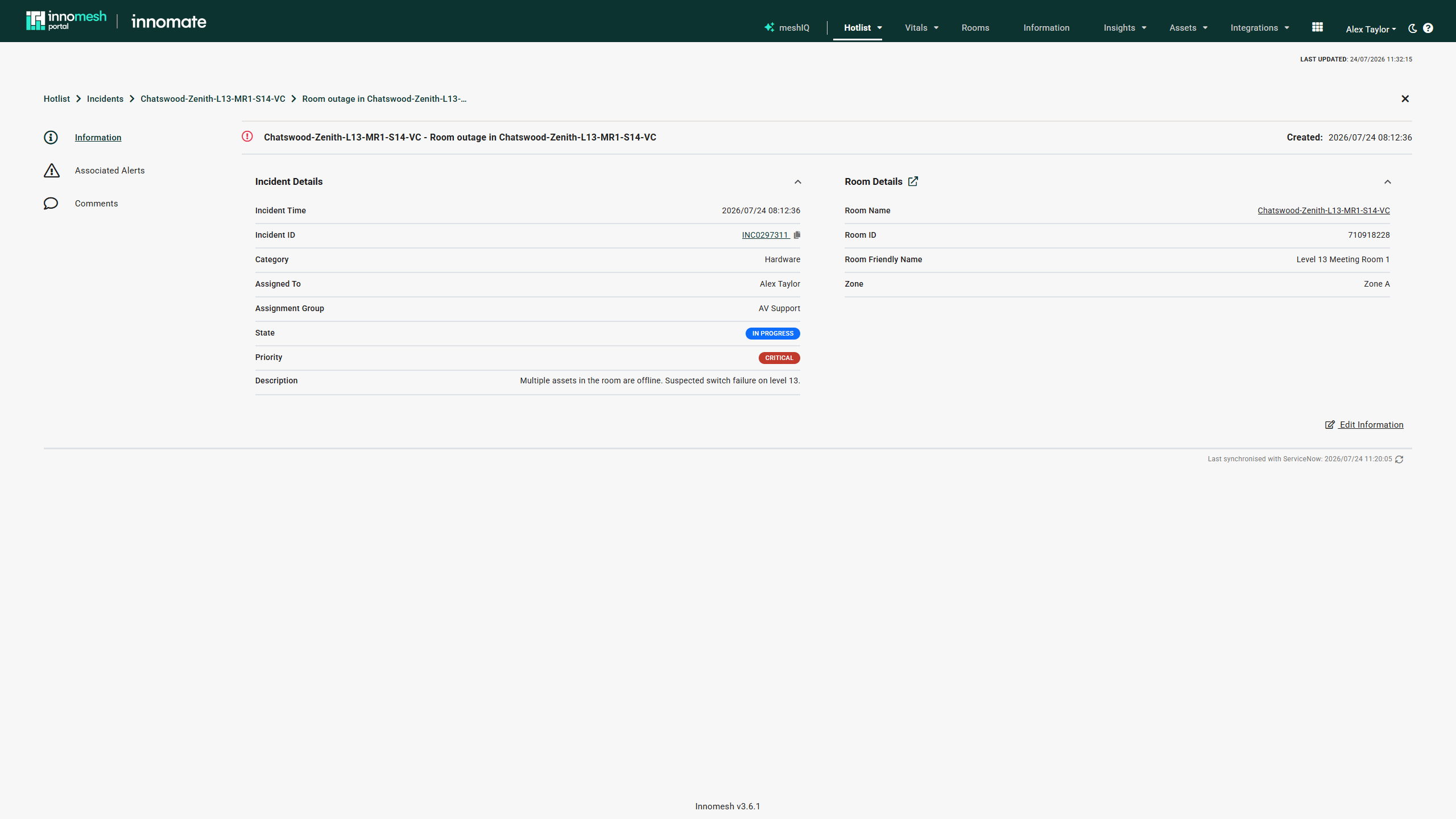 A ServiceNow-synchronised incident in Innomesh Portal
How Synchronisation Works
| Event | Direction | Timing |
|---|---|---|
| Incident created in Innomesh (manually or by an incident rule) | Innomesh to ServiceNow | Immediate |
| Incident edited, commented on, or resolved in Innomesh | Innomesh to ServiceNow | Immediate |
| Incident created or updated in ServiceNow | ServiceNow to Innomesh | Scheduled pull, typically every 15 minutes |
Incidents are matched between the two systems by the ServiceNow incident number. The synchronised fields include the incident name, description, state, priority, assignee, assignment group, comments, and creation time.
When a ServiceNow incident has no matching Innomesh incident, it is created in Innomesh automatically. Imported incidents are scoped to the matching Room when the ServiceNow record identifies a monitored room, and to Global otherwise, and are created without automatic resolution.
What Changes in Portal
For tenancies with the integration enabled, Incident Management behaves as described in the Incidents Overview, with the following ServiceNow-specific behaviour:
- Incident ID: the ID column and the detail view carry the ServiceNow incident number. Where the connector provides a link, clicking the ID opens the incident in ServiceNow in a new tab.
- Assigned To and Assignment Group: sourced from ServiceNow and read-only in Innomesh. Assignment is managed through your service desk workflows.
- Categories, Impact, Urgency, and Resolution Codes: the options offered in Innomesh are mapped to your ServiceNow configuration during onboarding. Where ServiceNow fixes a value, the field is read-only in Innomesh, and fields your ServiceNow configuration does not use are hidden.
- Comments: comments posted in Innomesh are appended to the ServiceNow incident, and service desk comments appear in the incident’s Comments section.
- Last synchronised: the footer of the Incident Detail View shows when the incident was last synchronised with ServiceNow.
Enabling the Integration
The integration is delivered as a tenant-specific connector that Innomate builds and configures for your ServiceNow environment, since incident APIs, categories, and resolution codes differ between organisations. During onboarding, Innomate maps your ServiceNow categories, impact and urgency options, states, and resolution codes to Innomesh.
To enable the integration, contact Innomate. You will need to provide access to a ServiceNow API that supports creating, reading, and updating incidents, along with credentials for a suitable service account.