

Released to production progressively between 10/09/2026 and 23/10/2026 (Australia, US and EU).
This release lets you act on many devices from a single confirmation, limits answers to the sites and user groups your role allows, moves meshIQ to newer AI models, and fixes a range of date, table, and device-lookup issues.
Release Highlights
- One confirmation for many devices: the same action on several devices is confirmed once and runs on all of them, up to 25 per confirmation.
- Answers scoped to your access: charts and query results are limited to the sites and user groups your role grants.
- Newer, faster models: meshIQ now runs on Claude Sonnet 5.5 and Claude Haiku 5.5, with your data still processed in your own region.
Run One Action on Many Devices
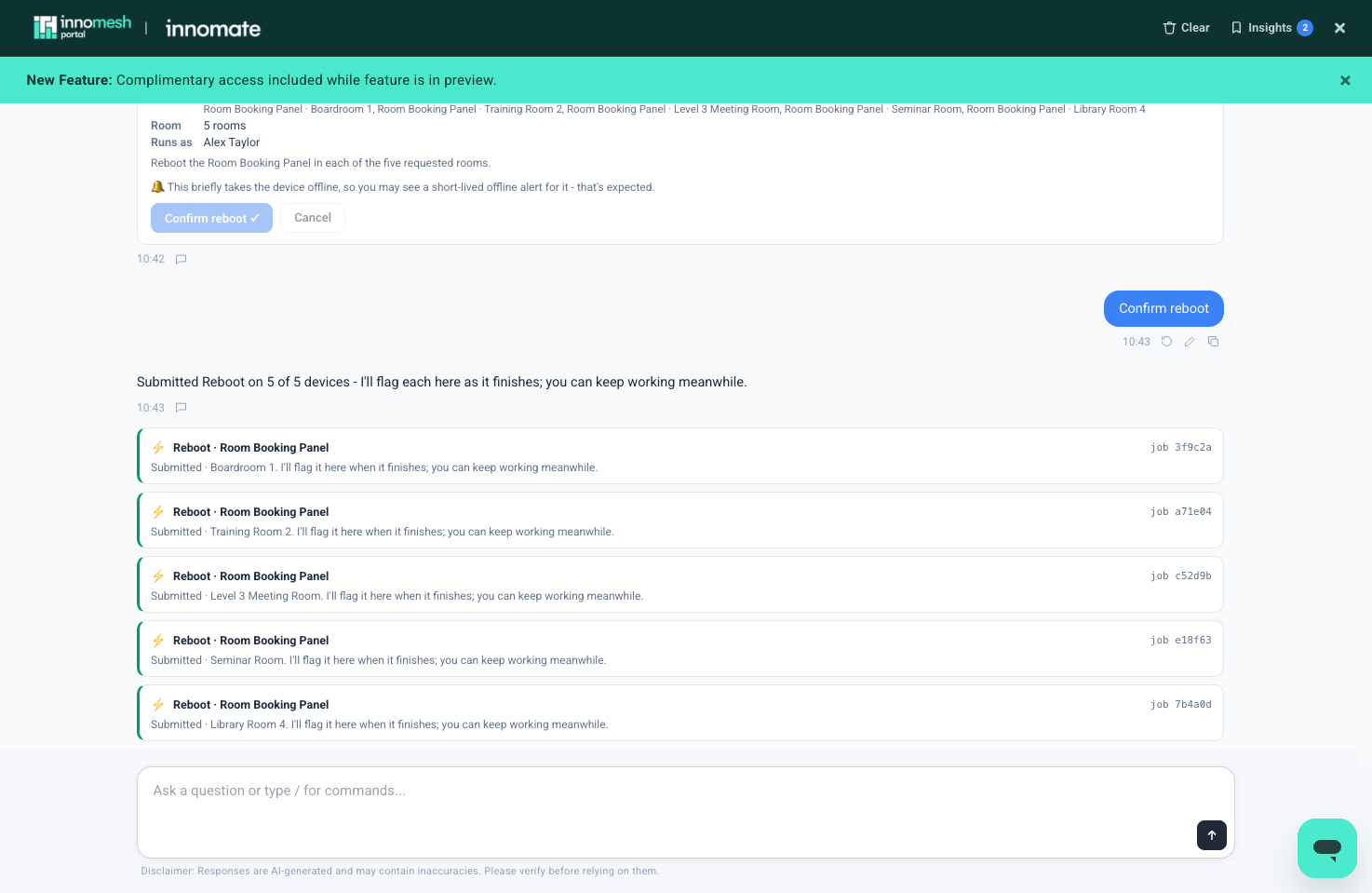
Asking meshIQ to run the same action on several devices now produces a single confirmation card that lists every device. Confirming it runs the action on each device, and each one is tracked as its own background job with its own result.
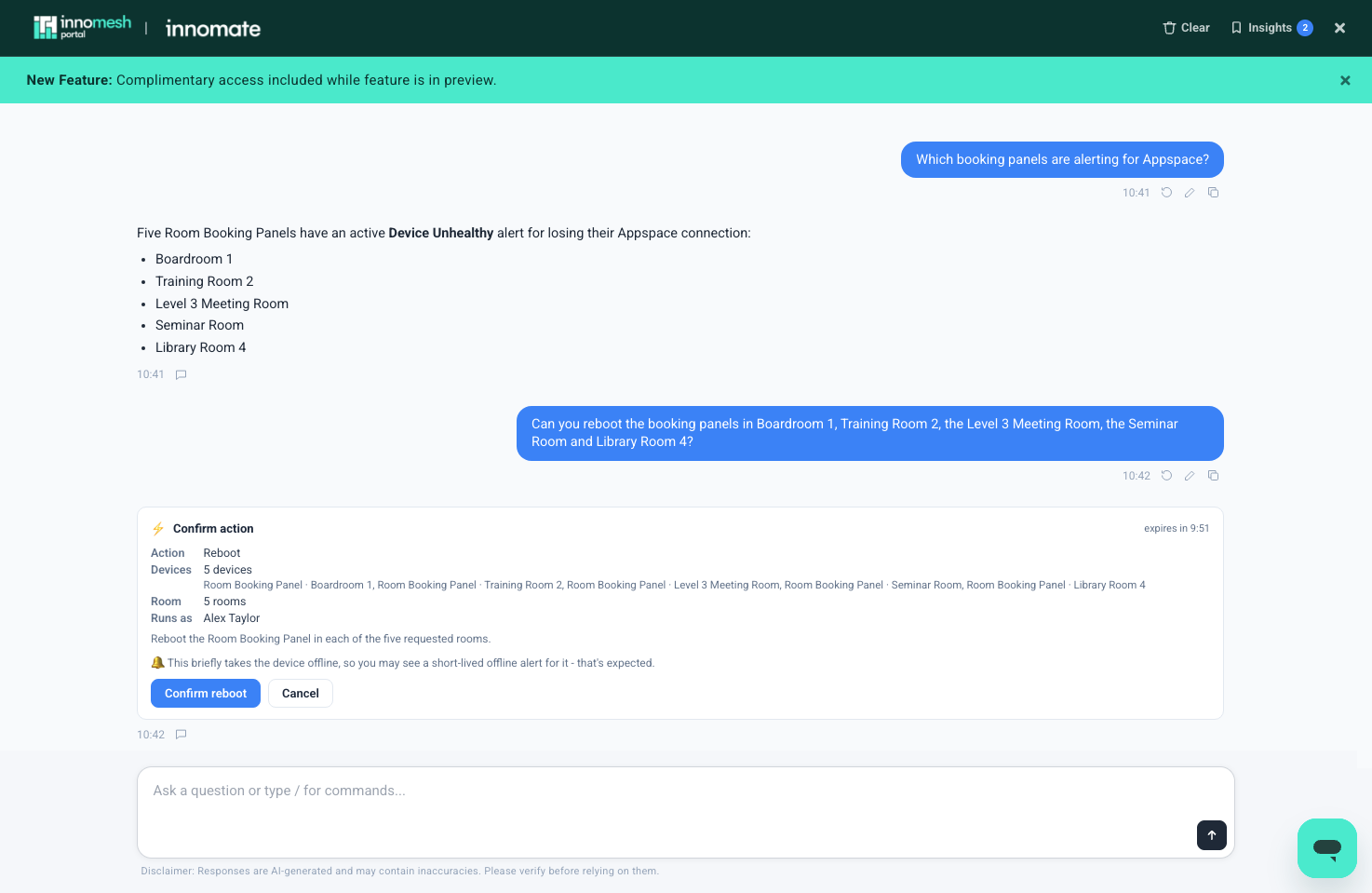
- Up to 25 devices can be confirmed at once. For a longer list, meshIQ confirms the first 25, then offers the next group when you continue.
- The confirmation card appears faster, because meshIQ checks the devices in parallel.
- Destructive actions such as Factory Reset still run one device at a time, and still ask you to type the asset ID to confirm.
Previously, meshIQ proposed one device at a time and waited for you to ask for the next one.
You can ask:
- “Reboot the booking panels in Boardroom 1, Training Room 2 and the Level 3 Meeting Room.”
- “Can you reboot all the booking panels that are alerting for Appspace?”
- “Get a preview from the touch panels in every room on Level 2.”
For the full procedure, see Running Asset Actions from meshIQ.
Answers Scoped to Your Sites and User Groups
meshIQ results now respect the sites and user groups your role grants, in the same way the rest of the Portal does.
- Charts and query results include only the sites and user groups you have access to.
- A site or user group selected in the Portal narrows the results further, but never widens them beyond your access.
- A role with no access to a site returns no results for it, rather than falling back to every site.
Newer AI Models
meshIQ now runs on Anthropic’s Claude Sonnet 5.5 for answering questions and Claude Haiku 5.5 for background tasks such as remembering details from earlier in the conversation.
In our standard set of 71 test questions, every question was answered in the time allowed (previously 69 of 71), and the full set completed in about 40% less time. Requests are processed in the region your tenancy is hosted in: Australia, the US, or the EU.
Room Previews and Device Lookups
Room previews ask what you mean. A request for a room “preview” now asks whether you want room photos, a live screenshot from a panel, or the floorplan and schematics, before fetching anything. If a room has no photos on file, meshIQ offers the room’s linked documents and the devices that can capture a live screenshot, rather than reporting that nothing is available.
Device lookups are more precise. Asking about a specific device, such as “the touch panel in Boardroom 1”, offers only the matching devices rather than every device in the room. When no device matches the name used, meshIQ offers the room’s devices instead of returning an empty reply.
Device lookups are faster. Finding a device in a room and showing its actions now takes about a third of the time it did. See Performance below.
Asset Inventory Improvements
- Firmware column: asset inventory tables now include a Firmware column, so firmware versions are visible without asking for full device records.
- Consistent tables: inventory answers now render the same complete table every time, including standard columns such as Firmware and Room Type.
- Accurate offline counts: questions such as “How many offline displays are there?” now count the devices that are actually offline, rather than estimating from alerts.
Dates and Timezones
- Today’s date: meshIQ now always works from today’s date in your tenancy’s timezone. Questions such as “last week” or “what is today’s date?” previously could be answered against the wrong period.
- Room usage by local day: daily room usage figures now follow your local day, rather than the UTC day.
- Scheduled times: time-based automation policies and scheduled actions now use your tenancy’s timezone.
Security
- Tenant isolation: every meshIQ connection, message, and device action is now checked against the signed-in user’s own organisation.
- Audit trail: every meshIQ conversation is recorded against the verified signed-in user, alongside the existing attribution of device actions.
Bug Fixes
- Fixed tables of more than about 70 rows not appearing in the chat.
- Fixed estate-wide asset questions sometimes running out of time without returning an answer.
- Fixed the Submit Feedback icon being missing from answers that failed or timed out.
- Fixed maintenance mode checks working only one room at a time.
- Fixed Get Preview screenshots and room photos not being delivered for some tenancies.
- Fixed a device question sometimes showing a picker of every device in the room.
- Fixed questions about network response times sometimes timing out.
Performance
| Area | Before | After |
|---|---|---|
| Finding a device in a room and showing its actions | About 69 seconds | About 21 to 27 seconds |
| Standard set of 71 test questions | 69 of 71 answered in time | 71 of 71, in about 40% less time |